Cricut’s new StickerPix machines turn phone photos into stickers, prints and labels at home. Here is what they are, who they suit, and how I would use them.
I have a confession that most travellers will recognise. I have thousands of photos from trips I loved, and I almost never look at them. A market in the early morning light, a hand-painted sign on a side street, a plate of food I still think about. They sit in my phone, a few swipes deep, slowly turning into digital dust.
That is the gap Cricut is aiming at with its latest launch. On 25 September 2026, the company announced Cricut StickerPix Print + Cut™ and Cricut StickerPix Print™, two compact machines that turn photos from your camera roll into stickers, prints, labels and photo cards at home, in minutes. I haven’t had either on my bench yet, so think of this as a first look, plus the ways I would put them to work.
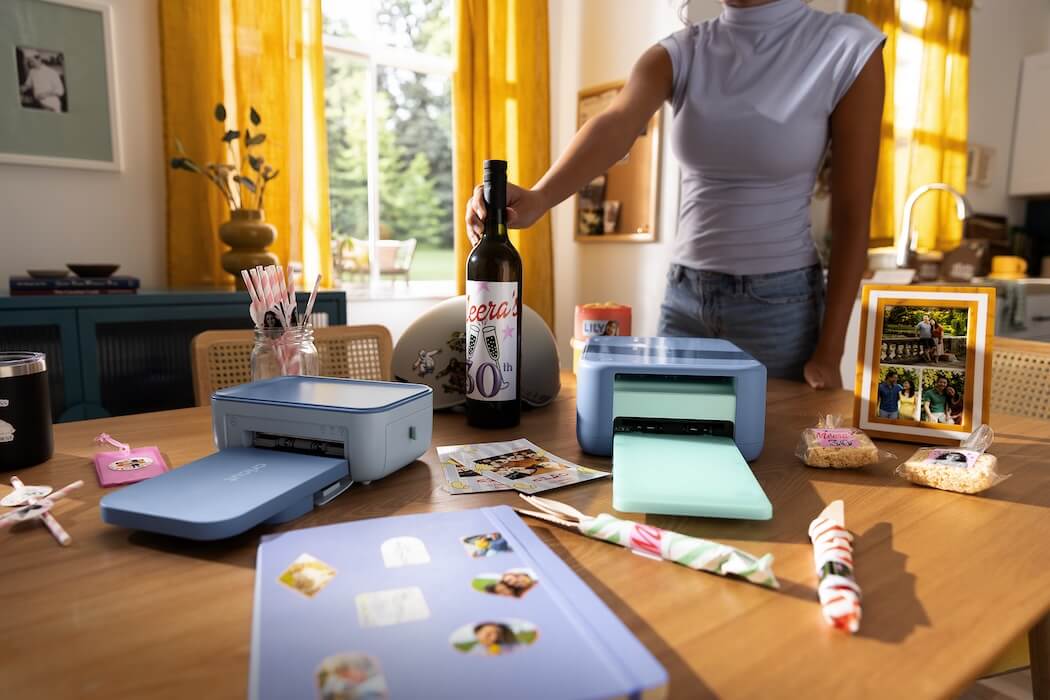
This is Cricut’s first step into sticker making and photo printing, building on its Design Space® creativity platform. Both machines use thermal dye sublimation printing, which Cricut says produces vivid, high resolution prints that resist water, scratches and fading. Both are compact enough to sit on a shelf or desk, and both connect to Design Space on mobile and desktop.
In Design Space you can start with your own photos, edit a template, use the AI powered tools, or browse a library of more than 1.8 million sticker images from hundreds of original artists. Then you send the design to the machine.
The two machines do different jobs:
Cricut StickerPix Print + Cut™ is the full workflow in one machine. It prints, laminates and cuts custom shapes with a built in fine point blade, so a photo comes out as a finished sticker with clean edges. It also makes photo prints, photo cards and custom cut labels.
Cricut StickerPix Print™ is the simpler option. It prints photos and photo cards, and it works with precut sticker and label sheets in a range of shapes and sizes, so no cutting is involved.
Ideas for Cricut StickerPix Print + Cut™
This is the machine for anyone who wants a shape that is truly theirs.
A sticker set from your last trip. Pick your five favourite photos and turn them into die cut stickers: the lighthouse, the espresso, the tram, the sunset. Stick them on a laptop, a drink bottle or the lid of your travel journal. It is a far better souvenir than a fridge magnet.
Luggage that is easy to spot. A custom cut luggage label with your name and a favourite photo makes your bag stand out on a crowded carousel. Water and scratch resistance matters here, because bags get a rough ride.
Labels that look considered. Pantry jars, spice tins, gift jars, wedding favours, party bags. Custom cut labels turn a tidy idea into something people ask about.
Packaging for small sellers. If you run a small shop or sell at weekend markets, branded stickers and labels printed on demand mean you can make a small batch today instead of ordering a big run.
Photo cards with a personal touch. Print a card with a favourite photo from the year and send it to someone who will actually keep it.
Ideas for Cricut StickerPix Print™
This is the machine for people who want the joy of printing without the extra step.
A travel journal that feels alive. Print small photos and stick them straight into a notebook beside your handwritten notes. A photo of the street, a line about the smell of the bakery. That is how memories survive.
A fridge wall of real moments. Print a handful of favourites each month and rotate them. Photos are far more fun when you can see them while you make breakfast.
Gift tags and seals. Precut circle stickers are made for sealing envelopes, closing gift wrap or labelling jars. Add a tiny photo or pattern and an ordinary parcel becomes a present.
Easy labels for busy households. School lunch boxes, drink bottles, storage tubs and shelves. Precut rectangles do the job quickly.
Postcards from home. Print a photo, write on the back and post it. In a world of instant messages, a real postcard still gets pride of place on someone’s bench.
Cricut points to three trends behind these machines, and I think they are right. Our phones hold more photos than ever, yet most never leave the screen. Stickers have become a visual language for self expression and community. And AI is giving people new ways to turn everyday photos into designs.
What I like is that StickerPix makes the physical end of all that easy. The best part of travel is the memory, and these machines are a way to hold onto it.
Availability: From 15 October 2026 at leading retailers, including Spotlight and Harvey Norman in Australia and New Zealand.
Cricut StickerPix Print + Cut™
- Bundle (machine, 18 sticker sheets, 18 photo paper sheets, 1 ink cartridge): AUD $469 / NZD $579
- Sticker Sheets & Ink Cartridges Set (72 sheets, 2 ink cartridges): AUD $84.95 / NZD $109.95
- Photo Paper & Ink Cartridges Set (72 sheets, 2 ink cartridges): AUD $69.95 / NZD $89.95
Cricut StickerPix Print™
- Bundle (machine, 18 precut rectangle sheets, 18 precut circle sheets, 18 photo paper sheets, 1 ink cartridge): AUD $289 / NZD $349
- Sticker Sheets, Photo Paper & Ink Cartridge Set: AUD $44.95 / NZD $59.95
- Precut Sticker Sheets & Ink Cartridge Set (18 precut rectangle sheets, 18 precut circle sheets, 18 precut square sheets, 2 ink cartridges): AUD $64.95 / NZD $79.95
Which one should you choose? If you want custom shapes and finished stickers from start to end, go with Print + Cut. If you mostly want photo prints, cards and quick labels, Print is the simpler, cheaper way in.
Every traveller I know has the same problem: great photos and nowhere for them to live. If these machines deliver on the promise, they turn a forgotten camera roll into something you can stick, send and give away. I will be keen to test them properly once they land.